AI Analytics
The AI layer over the analytics you already run. See AI traffic beside every other channel, split paid from organic, and record the AI crawlers a browser snippet structurally cannot see.
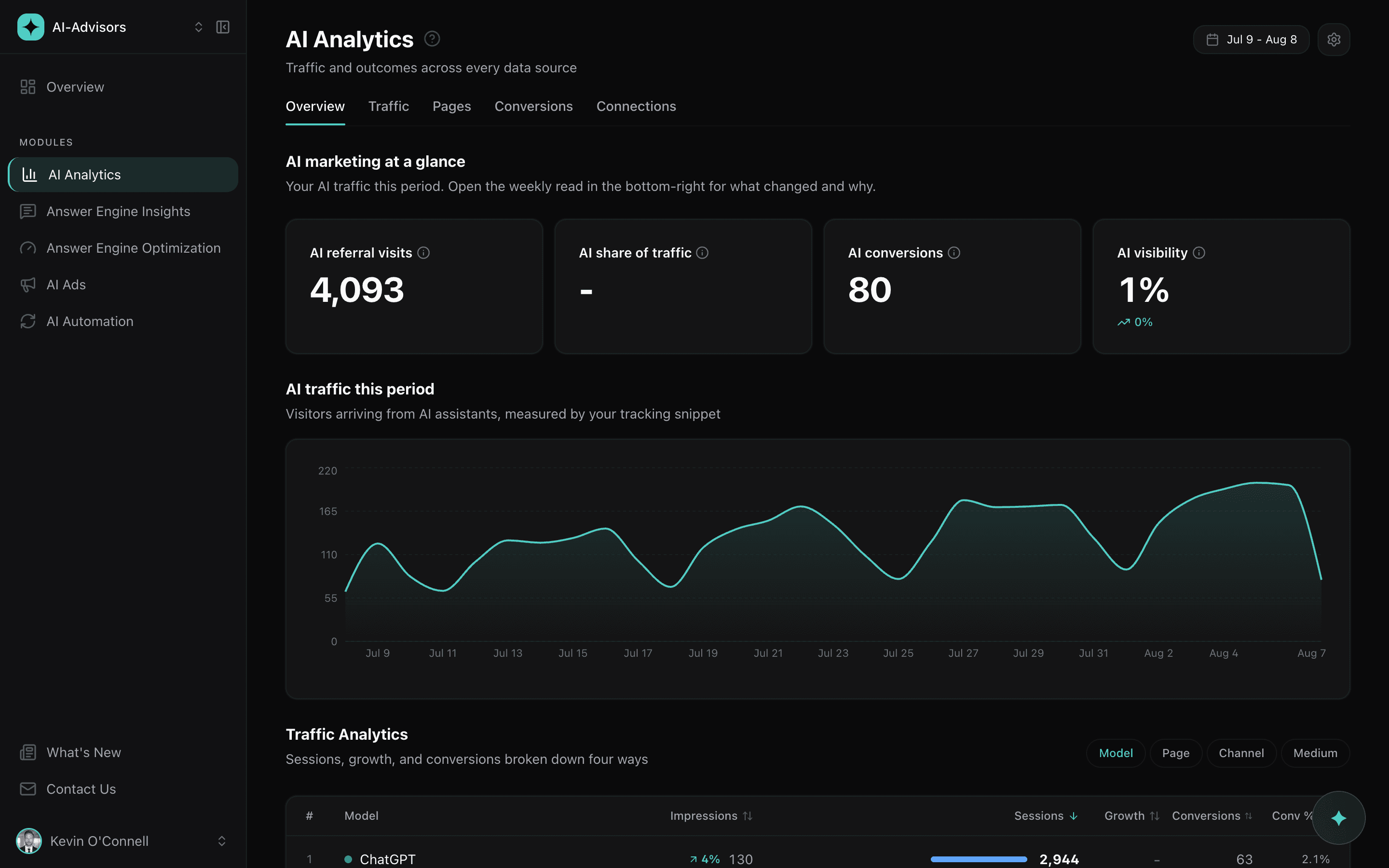
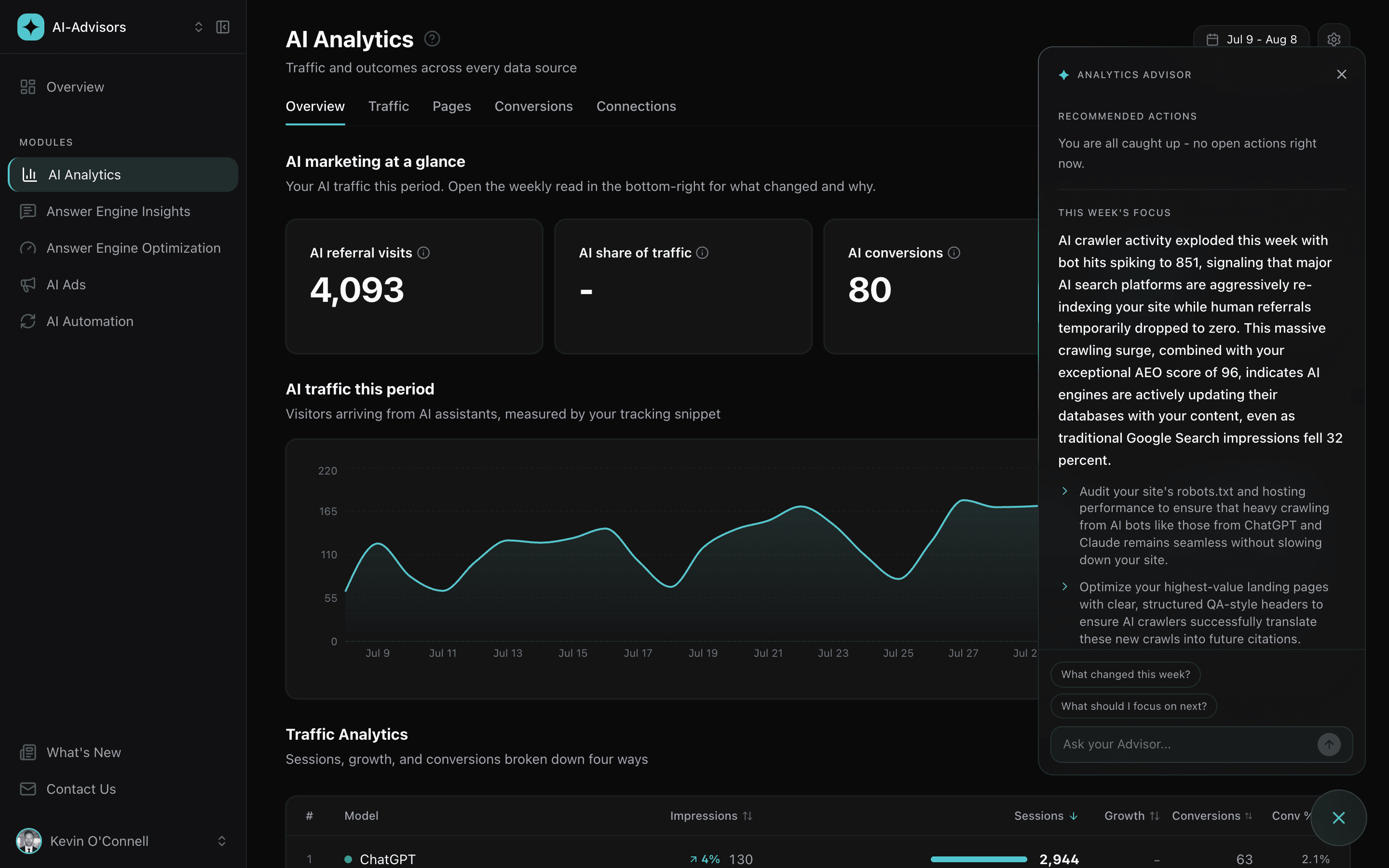
AI is a channel now. Measure it like one.
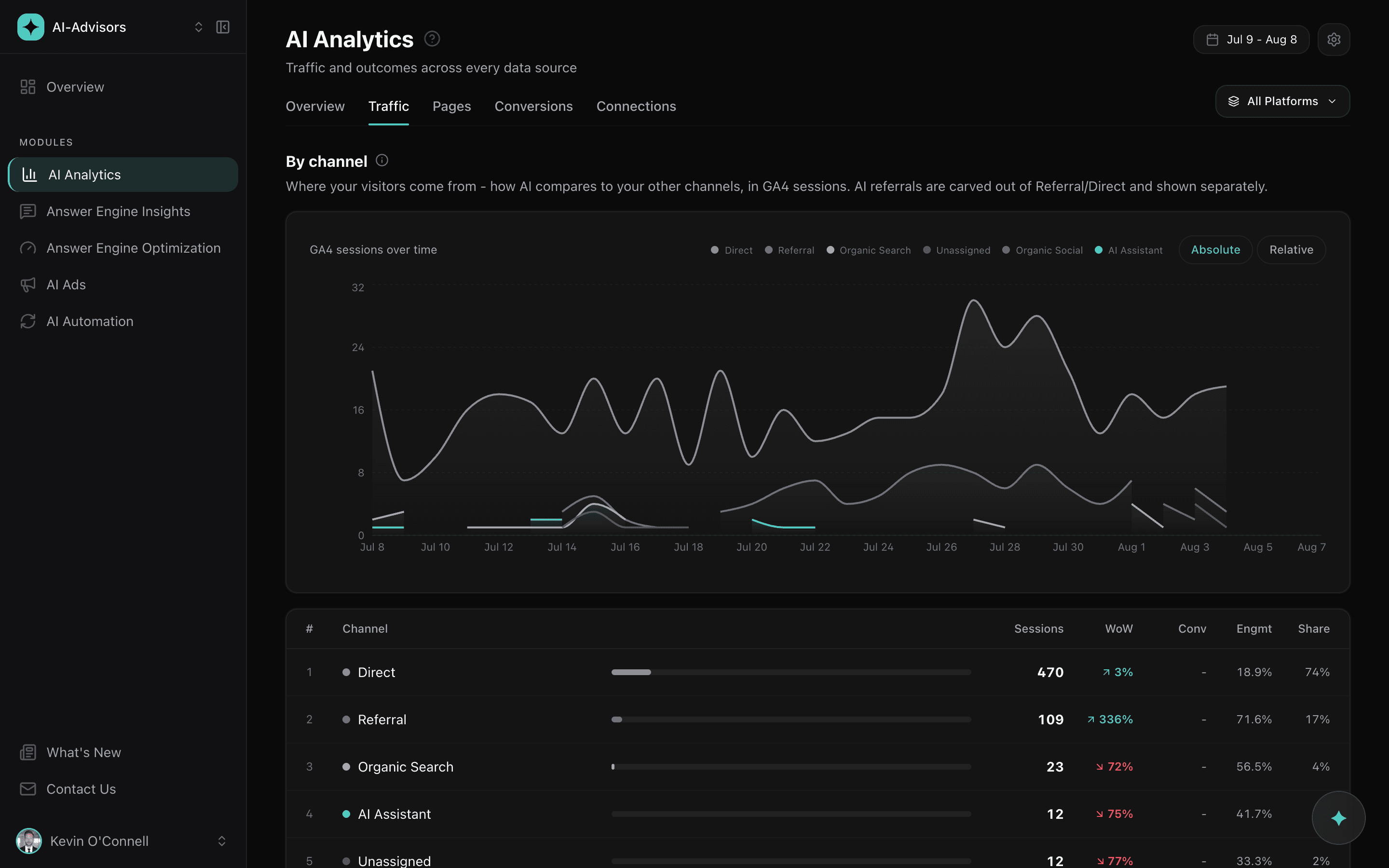
Your Google Analytics channel report buries AI arrivals inside Referral and Direct. AI Analytics carves them out and puts them on the same table as Organic Search, Paid, Direct and Social, with sessions, week-over-week movement, engagement and share. You get the one thing a channel report is for: whether this is growing fast enough to plan around, measured the same way you measure everything else.
Record the crawlers a browser cannot see
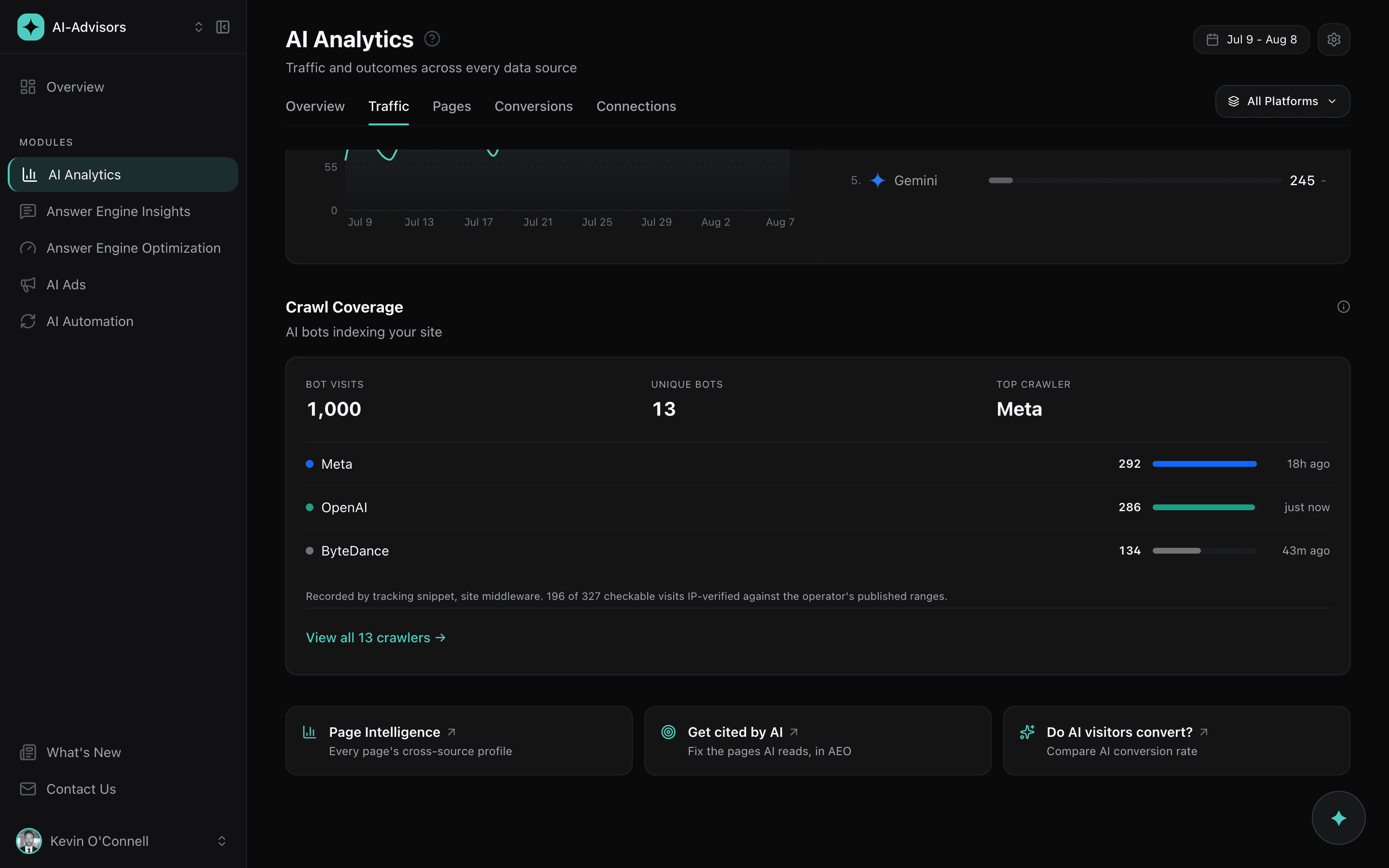
AI crawlers do not run JavaScript. That is not a tuning problem, it is how they work, and it means a browser tracking snippet can never record GPTBot, ClaudeBot, OAI-SearchBot or PerplexityBot no matter how well it is installed. So we collect crawls on your server instead: a Cloudflare Worker, one file of Next.js middleware, or the WordPress plugin. Crawl Coverage then names which method recorded each visit, so you always know what your numbers are built on.
Split paid AI from organic AI
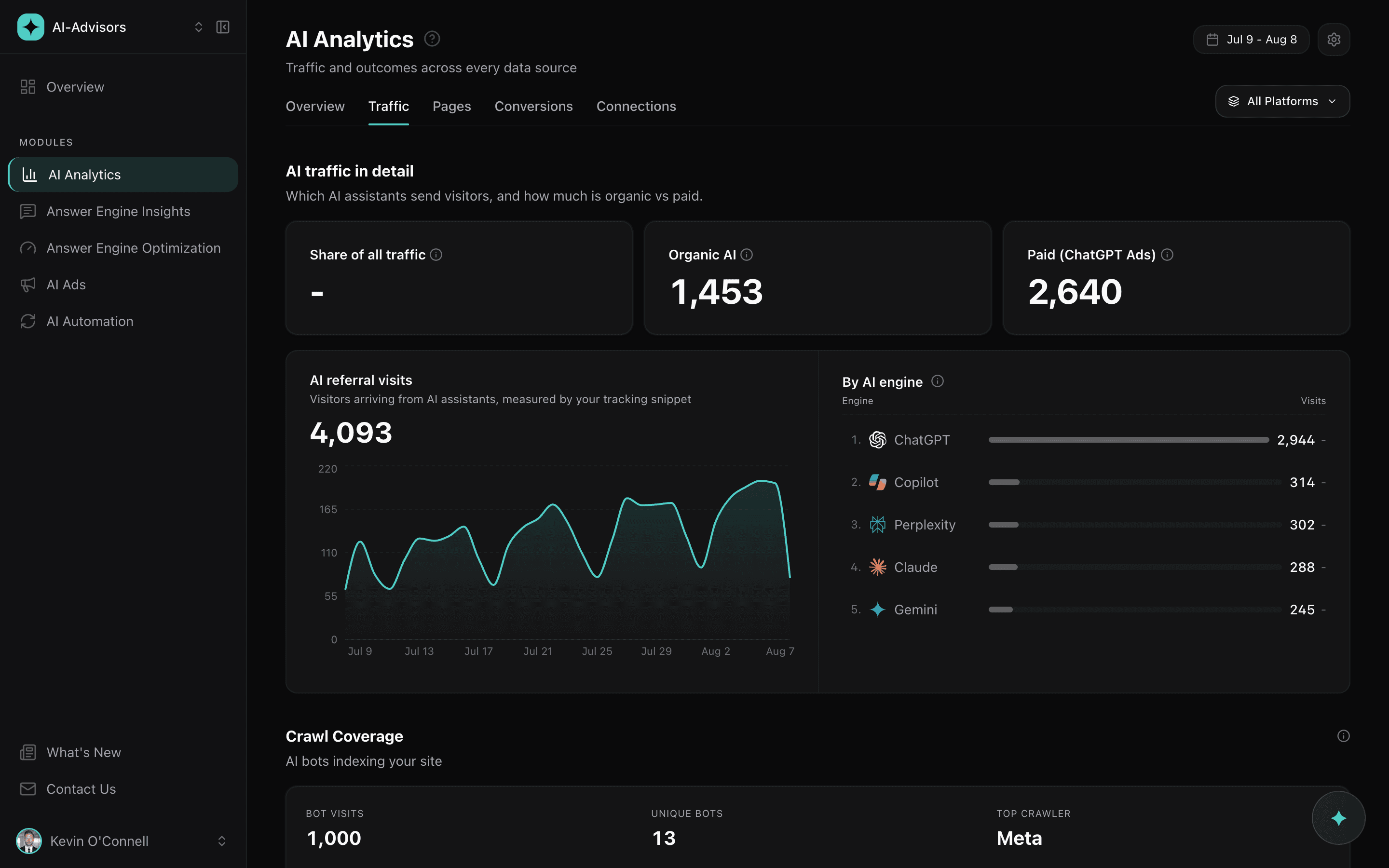
When ChatGPT Ads sends a paid click, the referrer is often stripped, so it lands in your analytics as Direct and disappears. AI Analytics reads OpenAI's own click identifier and separates paid from earned. You see organic AI referrals and paid ChatGPT Ads visits side by side, per assistant and per page, and the paid side carries through to spend, click capture and cost per conversion.
Find out whether AI traffic actually converts
Visits are not the point. The tracking snippet watches for lead-shaped form submissions and attributes each one back to the AI visit that produced it, so you get a conversion rate for AI traffic, the split between organic and paid, and which forms and pages do the converting. Where you are also running ChatGPT Ads, it reconciles the clicks the platform reports against the visits your site actually recorded, so a tracking gap shows up as a tracking gap instead of hiding inside a cost per conversion.
An advisor that reads every source at once
Crawl data, search demand, AI referrals, conversions and your AEO score each tell you a fragment. The Analytics Advisor reads them together and writes what changed this week and why, then turns it into two or three things worth doing. You can ask it a follow-up in the same panel. It never touches your ad budgets or bids; those decisions stay yours.
Install it where it belongs
The JavaScript snippet handles the human half: visits referred from AI assistants, which assistant sent them, where they landed, and the forms they submit. Paste it in your head tag or push it through Google Tag Manager. Crawls need a server-side method, and the app tells you which one fits your stack rather than making you guess. Run both and nothing is double counted.
Tracks the 6 AI engines your buyers actually use
Crawler activity and referral traffic from every major AI platform, identified by real user agent.
 ChatGPT
 Gemini
 Claude
 Perplexity
 Microsoft Copilot
 Meta AI
Built to measure AI honestly, including the parts that are inconvenient
Works with your other AI-Advisors modules
Frequently Asked Questions
What are AI bot crawlers?
AI bot crawlers are automated programs AI platforms send to read and index your website. GPTBot and OAI-SearchBot work for ChatGPT, ClaudeBot and Claude-SearchBot for Claude, PerplexityBot for Perplexity, and Googlebot for Google, whose standard crawl also feeds Google AI Overviews and AI Mode. Tracking them tells you which AI platforms are actively reading your content, which is the precondition for being cited in their answers.
Why can't a JavaScript snippet track AI crawlers?
Because AI crawlers do not execute JavaScript. A browser snippet only runs after a browser parses your page and runs scripts, and a crawler fetching your HTML never does that. This is a property of how crawlers work, not a limitation you can configure around, and it means any tool promising crawler tracking from a script tag alone cannot deliver it. AI-Advisors collects crawls on the server instead, through a Cloudflare Worker, a Next.js middleware file, or the WordPress plugin.
How do I track AI bots on my website?
Install one of the three server-side methods, where the request's user agent is visible before your page renders. The Cloudflare Worker suits sites already behind Cloudflare and additionally sees requests served from cache. The Next.js middleware is a single file you drop into your project and works on any host. The WordPress plugin is a one-click install. The app detects your stack and recommends the right one. Add the JavaScript snippet as well to capture the human side: visits referred from AI assistants and the forms they submit.
What AI bots does AI Analytics identify?
18 crawler user agents: GPTBot, ChatGPT-User, OAI-SearchBot and OAI-AdsBot from OpenAI; ClaudeBot, Claude-User, Claude-SearchBot and anthropic-ai from Anthropic; Google-Extended and Googlebot; PerplexityBot; Bingbot; FacebookExternalHit and meta-externalagent from Meta; Bytespider; CCBot; cohere-ai; and Applebot-Extended. Each is tracked individually with its own visit count, pages crawled, and last seen time, so you can find the exact crawler behind a spike.
What does IP-verified mean?
A crawl arrives claiming a user agent, and a user agent is trivial to fake. Where an operator publishes the IP address ranges its crawlers use, AI-Advisors checks the request's source address against that list. A match is marked verified. A non-match is marked unproven rather than spoofed, because published ranges go stale and operators routinely add addresses before updating the file. Where an operator publishes nothing, the visit is marked as not checkable rather than counted as a failure.
Does the tracking snippet slow down my website?
No. The snippet only acts when it detects AI traffic, which is a small fraction of visitors. For everyone else it does nothing: no network requests, no processing. The script itself is under 1KB.
Can I use AI Analytics with Google Analytics?
Yes, and it is designed to sit on top of it rather than replace it. GA4 remains the source of truth for site totals and channel sessions; AI-Advisors carves AI arrivals out of Referral and Direct so they can be compared against your other channels without being double counted, and adds the two things GA4 structurally cannot report: AI crawler activity, and paid ChatGPT Ads clicks that arrive with their referrer stripped.
What can AI Analytics tell me that my existing analytics cannot?
Four things. Which AI crawlers read your site, and whether they really were who they claimed to be. How much human traffic AI assistants send you, per assistant and per page. How much of that is paid ChatGPT Ads versus earned, which your analytics records as Direct once the referrer is stripped. And how those move in relation to your search demand, your AEO score, and your conversions, week over week.