AI Automation
Your background engine. Scheduled scans, automated fixes, and a weekly update delivered to email, Slack, or Google Sheets.
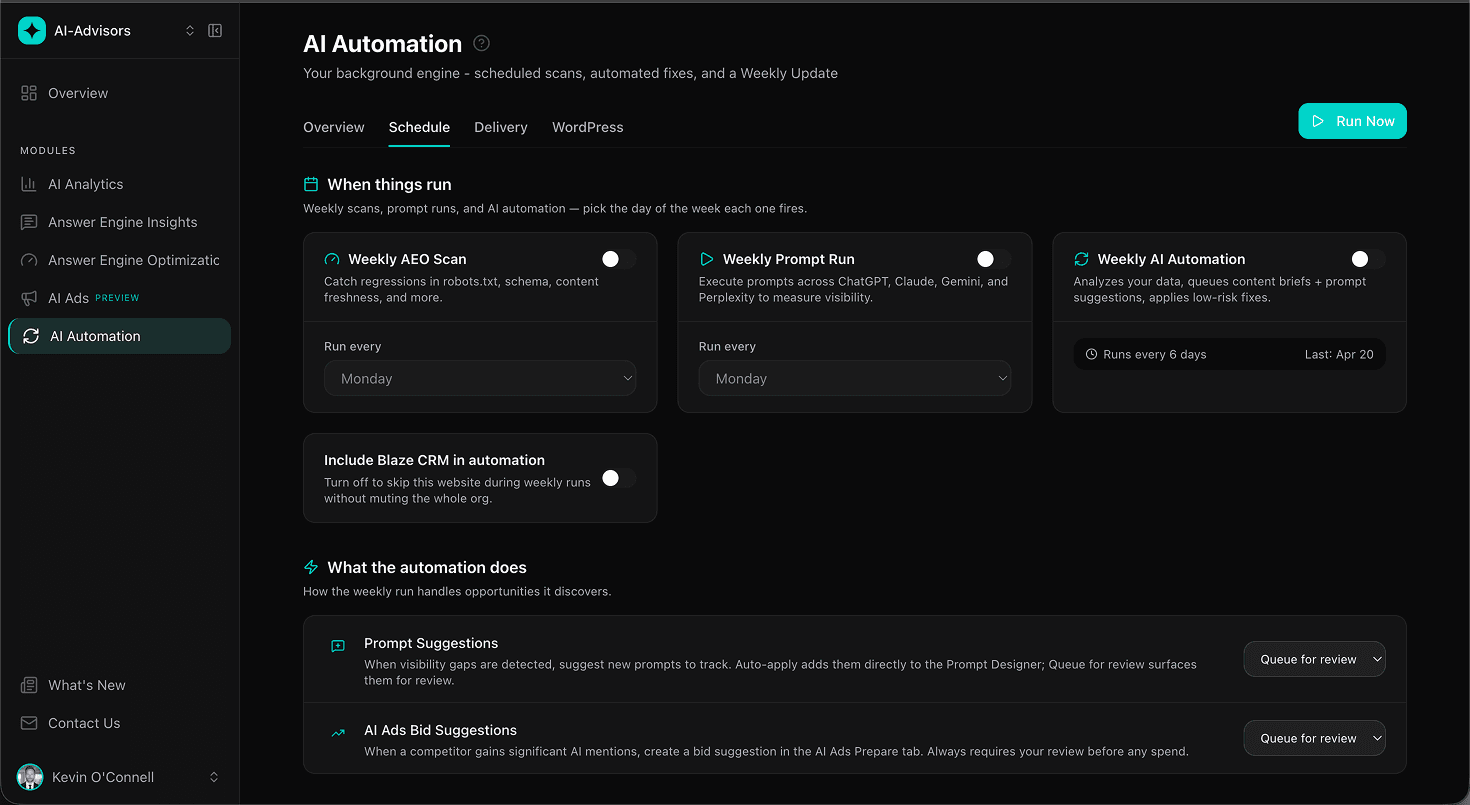
Schedule your automations
Three weekly jobs, one toggle each. Weekly AEO Scan catches regressions. Weekly Prompt Run refreshes visibility. Weekly AI Automation analyzes findings and queues content briefs plus ad-bid suggestions. Pick a day for each and forget about them.
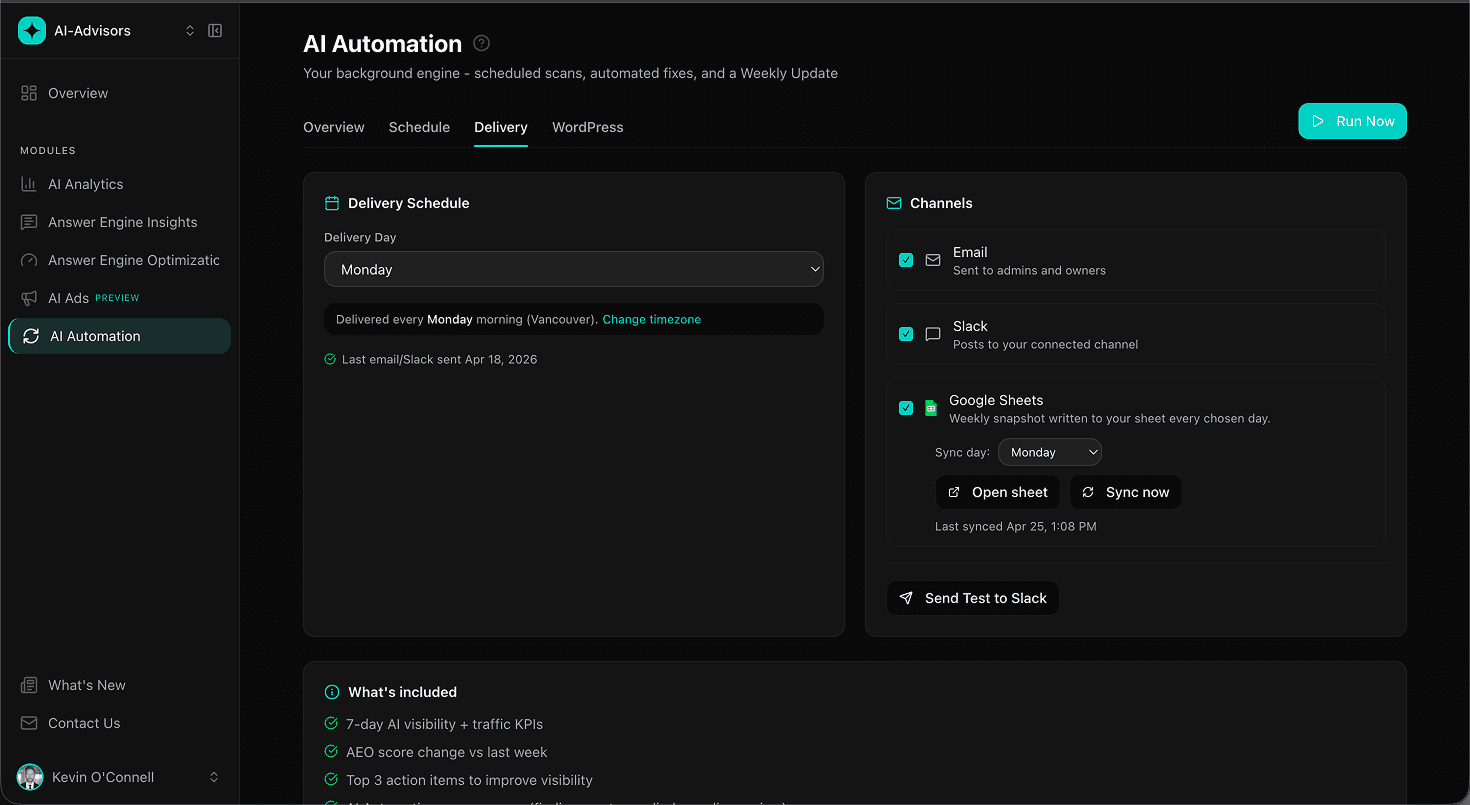
Your weekly update, in your team's channel
Every Monday morning, a curated summary: 7-day KPIs, recommendations completed by your team, AI Automation run results, and focus areas for the week. Delivered to email, a Slack channel, or a Google Sheet that updates itself in place. Pick the one your team already checks.
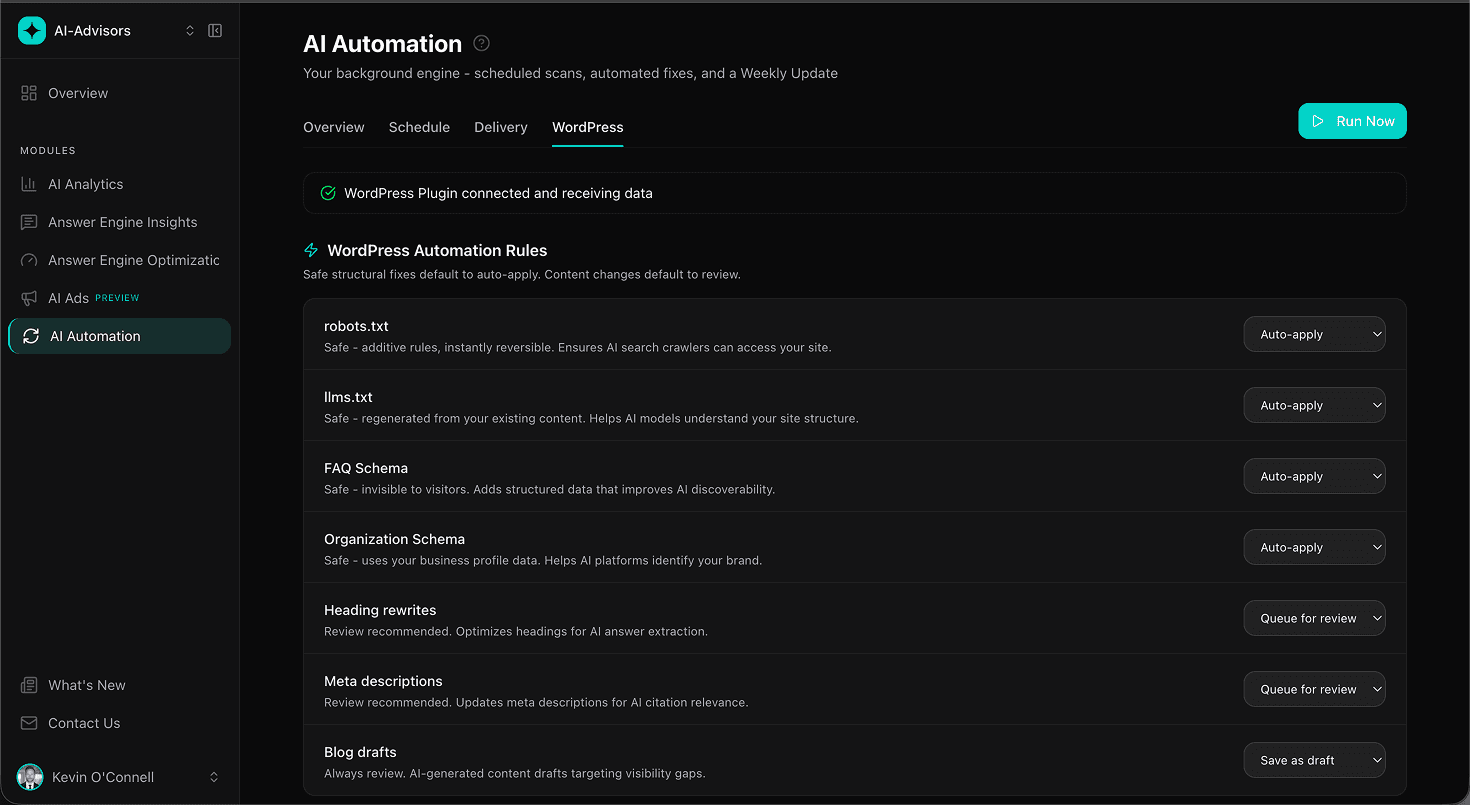
WordPress plugin: seven fixes, three ways to handle each
Connect WordPress once, then decide how the plugin handles each type of AEO fix. Auto-apply the safe ones, queue the judgment calls for review, or skip the rest. You stay in control, the plugin does the tedious work.
Your data, inside your AI assistant
AI-Advisors ships an MCP server, so you can connect your workspace to Claude, Cursor, Windsurf, and any MCP-compatible tool. Generate a token, paste one command, and ask for this week's read in the chat, or point an agent at it to flag brand-accuracy issues. Read-only, scoped to your workspace, on every paid plan.
Connects to the tools your team already uses
Email, Slack, Google Sheets, WordPress, and an MCP server for Claude, Cursor, and Windsurf. Pick the ones your team lives in.
 Email
Email Slack
Slack Google Sheets
 WordPress
 MCP Server
Built to run quietly in the background, not invent its own work
Frequently Asked Questions
What does AI Automation do?
AI Automation runs weekly AEO audits and intelligence briefings on your behalf, queues prompt and ad-bid suggestions when it detects visibility gaps, applies many fixes automatically through the WordPress plugin, and delivers a weekly summary to your team's channel. It's a background engine: results surface in the modules they belong to, so you don't have to log in just to see what happened.
Where does Content Studio live?
Content Studio is part of Answer Engine Insights, not AI Automation. AI Automation hands off to Content Studio when a content gap is identified. See the Answer Engine Insights platform page for details. Plan limits: Starter 1 draft per week, Growth 3 per week (pooled across all websites), Enterprise unlimited.
Does the WordPress plugin apply fixes automatically?
Yes, on a per-rule basis. The plugin manages seven named fix types: robots.txt, llms.txt, FAQPage schema, Organization schema, heading rewrites, meta descriptions, and AI blog drafts. Each rule can be set to Auto-apply (ship the fix immediately), Queue for review (draft the change and wait for your approval), or Do nothing (ignore that rule). Blog drafts use Save as draft instead of Auto-apply to prevent unintended publishing. WordPress plugin is included on Growth and Enterprise.
How does the Weekly Update work?
Every Monday morning, the platform runs the weekly digest and delivers it to whichever channel you enabled: email, Slack, Google Sheets, or any combination. The summary includes 7-day KPIs (Visibility Score, citations, AEO score, bot crawls), a Completed Recommendations section showing the top 5 AEO recs your team shipped in the past 7 days (including WordPress plugin auto-apply attribution), the latest AI Automation run results, and focus areas for the week ahead. Google Sheets delivery creates a single sheet in your Drive with three data tabs (Visibility, Prompts, Citations) plus a My Dashboard scaffold for your own formulas, refreshed in place every week so you can bookmark the URL and check it whenever. All three delivery channels are available on every plan.
How do manual prompt runs work?
Every plan includes a weekly automated run of your tracked prompts across all AI platforms. Manual runs let you trigger additional runs on demand, useful after publishing new content, launching a campaign, or investigating a visibility change. Starter includes 1 manual run per week, Growth includes 3 per week (pooled across all websites), and Enterprise is unlimited.
What channels can the Weekly Update be delivered to?
Three channels today, all available on every plan: email, Slack (connect any Slack workspace), and Google Sheets. Enable one, two, or all three from the Delivery tab. Same numbers in every channel. The Sheets channel is especially useful for teams that live in spreadsheets: the sheet url is stable, so you can bookmark it or embed the data in internal dashboards.
Which plans include AI Automation features?
Scheduled scans, weekly intelligence briefings, manual runs, email delivery, Slack delivery, Google Sheets delivery, prompt and ad-bid suggestions, and impact tracking are available on every plan. WordPress auto-apply is included on Growth and Enterprise. Content Studio (which AI Automation hands off to for content gaps) lives inside Answer Engine Insights and scales by plan: 1 draft per week on Starter, 3 per week on Growth (pooled), unlimited on Enterprise.