
See the revenue AI search creates, matched to your HubSpot deals
AI-Advisors identifies which HubSpot contacts came from AI search - paid or organic - follows them into their deals, and reports the closed-won revenue and pipeline behind them. Attribution is deterministic, never modeled: paid ChatGPT Ads clicks match by exact click id, and ambiguous contacts are never guessed.
Overview
The HubSpot app is a ChatGPT Ads command center that lives inside your CRM. Convert the Google Ads campaigns you already run into launch-ready ChatGPT Ads for free, then create, launch, pause, and measure campaigns without leaving HubSpot. On a Growth plan the same screen carries the whole funnel, from impressions through to the closed-won deals the ads produced.
Most teams can see that AI search sends them traffic. Almost none can put a dollar figure on it. The HubSpot integration closes that gap: it reads the first-touch data HubSpot already records on every contact, classifies the contacts that came from ChatGPT, Claude, Gemini, Perplexity, or Copilot, and follows them into their deals - so your Conversions tab shows revenue from AI, pipeline from AI, and customers from AI as CRM facts, not estimates.
The paid side is exact. When someone clicks a ChatGPT ad, the click id survives into HubSpot's first-touch URL. AI-Advisors joins it to the ad click its snippet tracked on your site to identify the exact campaign, merges in campaign spend, and shows closed-won revenue per ChatGPT Ads campaign - with an always-visible note stating exactly how many contacts matched by click id.
The integration pushes value back into HubSpot too. Matched contacts get a namespaced AI-Advisors property group your team can build native lists, workflows, and reports on, so sales knows which leads came from AI search before the first call.
How it works
Turn Google Ads campaigns into ChatGPT Ads, free
Pick a Search campaign you already run and the converter rewrites it for ChatGPT Ads: ad copy adapted to a conversational surface, and your keywords turned into context hints, which are what decide when an ad can enter a conversation. It reads Google Ads and never changes it. Free, no credit card, and no ChatGPT Ads account needed to try it.
Create, launch, and manage campaigns without leaving HubSpot
Build a campaign from scratch in a HubSpot panel or launch a converted draft, then run it from one table: per-row Off and On switches, spend, clicks, impressions, and cost per click over the window you choose, sortable, with the columns you pick and a CSV export. Drill into a campaign for its ad groups and ads, edit budget and targeting, or duplicate anything to test a variant. Everything is created paused, so nothing spends until you switch it on.
Context hints suggested from the keywords you already bid on
Context hints are the closest thing ChatGPT Ads has to keywords, and a blank box is a hard place to start. Point at a Google Ads campaign and AI-Advisors proposes hints from the keywords it already contains, each with the keyword it came from and why it was suggested. Take the ones you want, and edit them any time afterwards.
Rejected ads surfaced before they cost you a week
A rejected ad stops serving silently, so a campaign can keep spending on its surviving ads while the one you cared about is dark. Rejections are called out on the overview and filterable in the ads table, with the fix path attached.
The funnel, and the records behind every number
Impressions to clicks to contacts to deals, with cost at each stage, amount spent, and ROI. Click contacts, deals, or closed-won revenue and you get the actual records that produced them, rendered from your CRM under your own HubSpot permissions. The delivery half works on its own; contacts and deals are part of a Growth plan.
Deterministic AI-source matching
Contacts are classified from HubSpot's own first-touch analytics in three tiers: an exact ChatGPT Ads click id in the first-touch URL, AI UTM tagging, or an AI platform referrer such as chatgpt.com or perplexity.ai. A contact with no clear AI signal is left unclassified - ambiguity is never modeled into the numbers.
AI-source properties written back to your contacts
Matched contacts get a dedicated AI-Advisors property group: AI-sourced, original AI platform, paid vs organic, first AI landing page, and the ChatGPT Ads campaign that brought them. Build HubSpot lists, workflows, lead scoring, and reports on AI-sourced demand without exporting anything, right down to a single campaign. Write-back is on by default and pausable any time from Settings.
A zero-PII mirror by design
Only AI-classified contacts are synced, and the mirror stores no names, emails, or phone numbers - those fields are never even requested from HubSpot's API. AI-Advisors keeps just the contact id, lifecycle stage, create date, and the first-touch fields used for classification. The drill-down reads names live from your CRM instead, so seeing who they are never means us storing who they are.
See it inside HubSpot
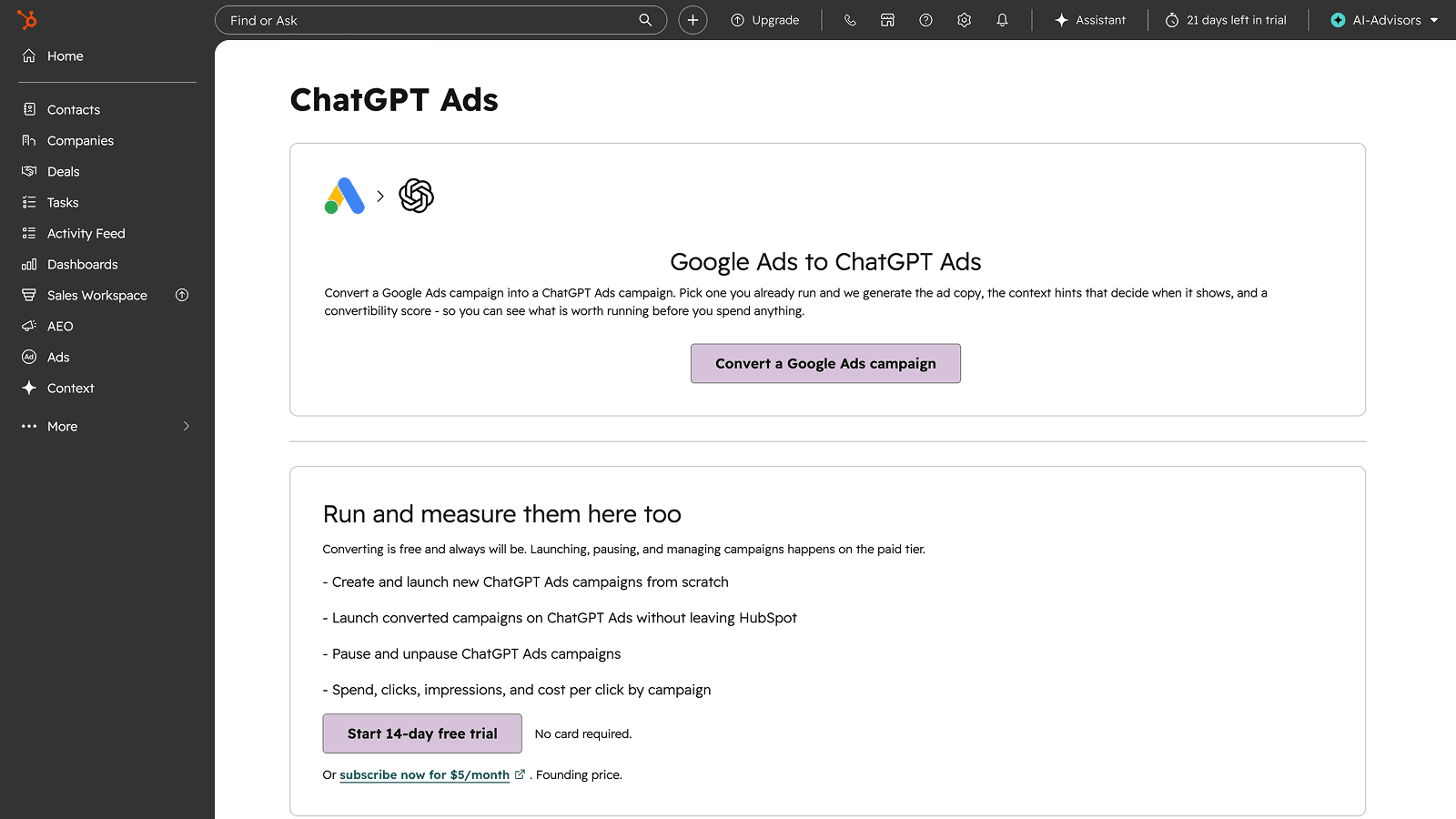
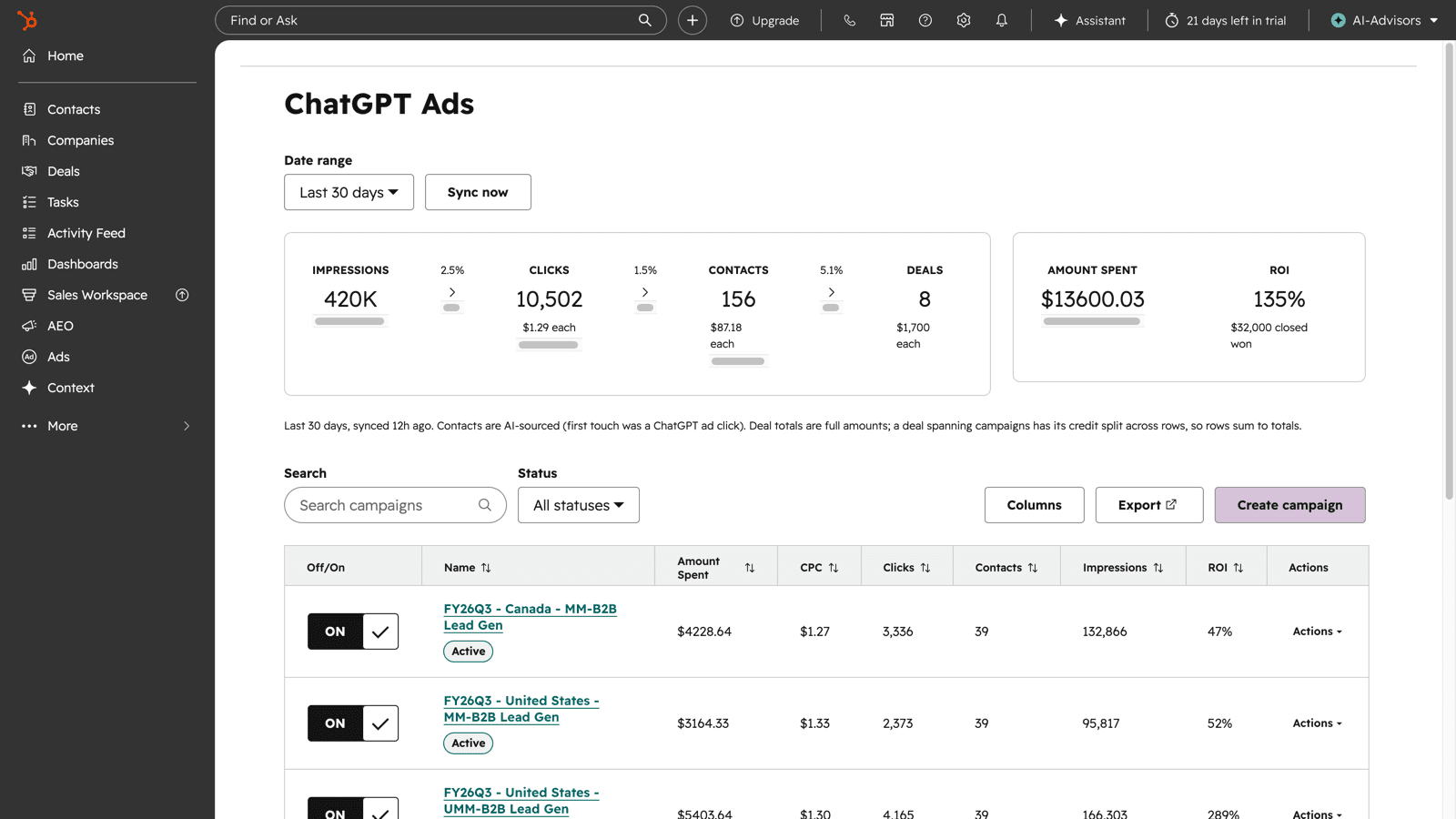
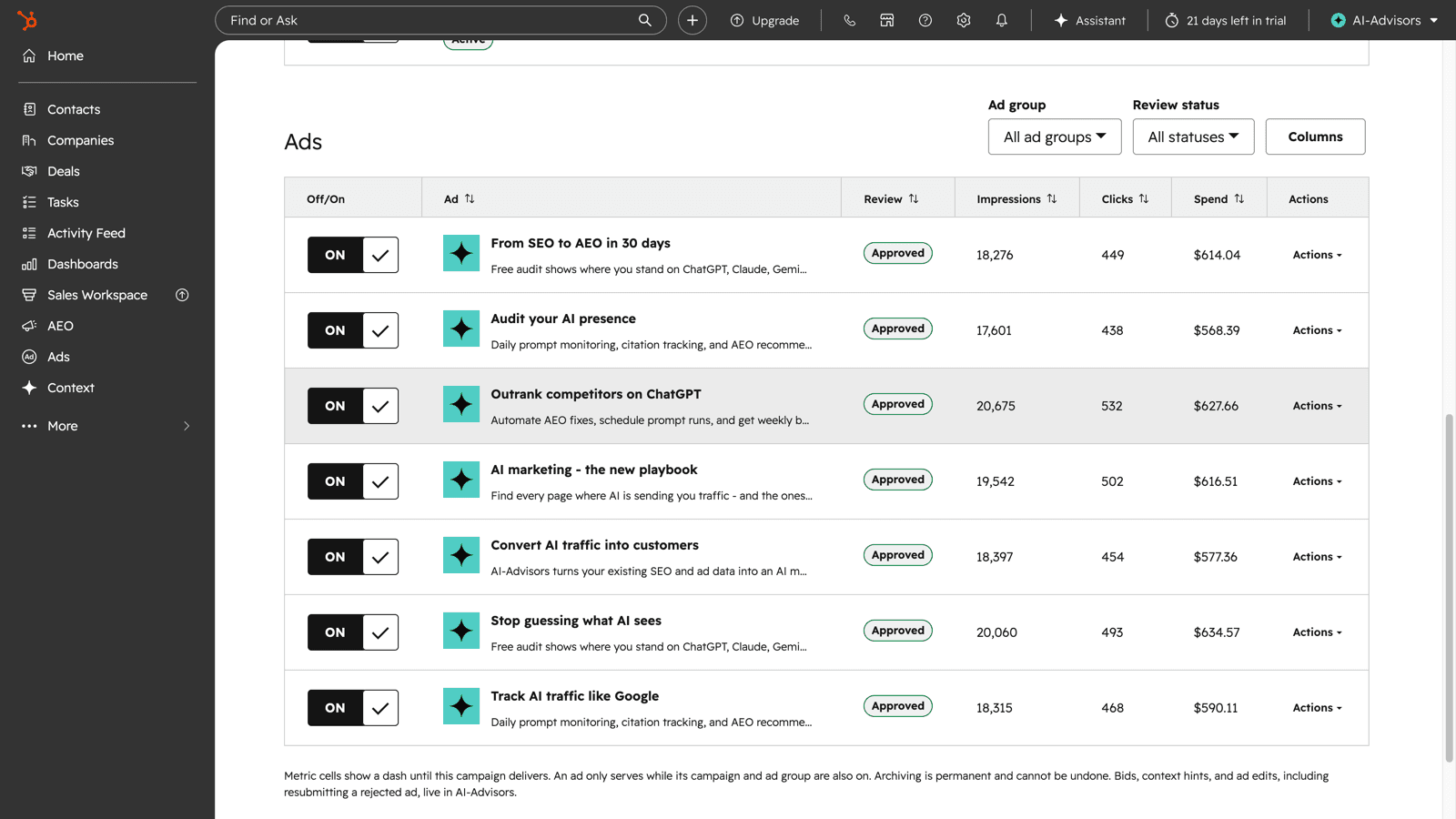
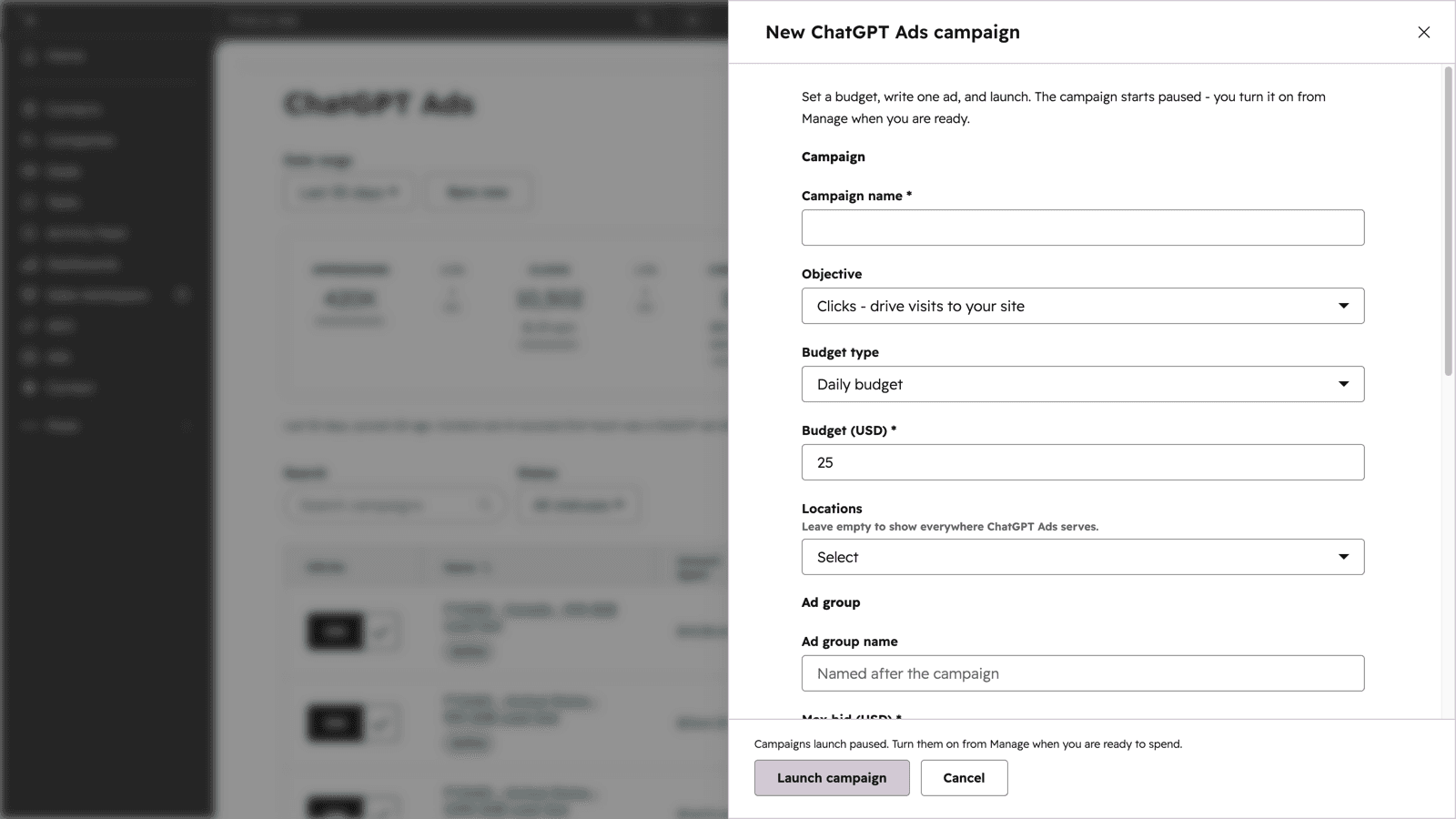
Real screens from the app running in HubSpot. Figures are sample data.
Set up
Setup is a standard OAuth connect - no code, no CSV exports, no field mapping. You need permission to install apps in HubSpot, and an owner or admin role if you already have an AI-Advisors workspace.
1. Create your AI-Advisors account, or sign in to an existing workspace. Signing up is free and takes no credit card. Installing the HubSpot app and using the Google Ads to ChatGPT Ads converter are free. Campaign management and CRM revenue attribution are paid, and you can start those from inside the app when you want them.
2. Open Settings, then Integrations, and find the HubSpot row. Click Configure. You are sent to HubSpot's own consent screen to approve the requested permissions.
3. On HubSpot's screen, choose the portal you want to connect and approve the requested permissions. The portal binds at consent, so there is nothing to pick or configure afterwards. If you manage several portals, make sure the one shown is the right one before approving.
4. You land back on the Integrations page and the HubSpot row shows your portal domain, a last-synced time, and a Sync now button. Click Sync now to run the first sync. Small portals finish in seconds; large ones run in the background and the row updates when it lands.
5. Revenue from AI appears on the Conversions tab in AI Analytics, and matched contacts get the AI-Advisors property group in HubSpot. To preview the layout before real data accumulates, load the clearly flagged demo data - it wipes itself automatically the first time a real AI-sourced contact syncs.
To disconnect: open the same HubSpot row, use the menu, and choose Disconnect. That revokes the token, stops all syncing, and removes the mirrored contacts and deals from AI-Advisors. The AI-Advisors properties already written onto your contacts stay in HubSpot, because they are your data - remove them from HubSpot's property settings if you want them gone.
Troubleshooting: if the row shows Sync delayed, click Sync now and check the portal is still authorized in HubSpot under Connected Apps. If a connection attempt fails with an expired or replaced state, close any other AI-Advisors tabs and start the connect again from a single tab.
Takes a few minutes
Data and permissions
The integration is built around a strict read posture: it reads the minimum needed to attribute revenue, writes only its own namespaced properties, and never stores personal data.
- Contacts' first-touch analytics: first URL, first referrer, source, lifecycle stage, create date
- Contact-to-deal associations for AI-classified contacts
- Those deals' name, amount, stage, pipeline, and close data
- Portal id and domain, for display and routing
- A namespaced AI-Advisors contact property group (five properties: AI-sourced, AI platform, paid vs organic, first AI landing page, ChatGPT Ads campaign)
- Property values on AI-matched contacts only - the landing page is stored as a path, with the click id stripped
- Contact names, emails, or phone numbers - never requested, never stored
- Companies, tickets, emails, or any object beyond contacts and their deals
- Your own properties - AI-Advisors writes only its own namespaced group, never changes deal amounts, stages, or close dates, and deletes nothing
- Your lists and workflows - it creates none and edits none
- Ad budgets, bids, or campaign state
OAuth scopes requested: identify the portal, read contacts, write contacts (for the AI-Advisors property group only), read deals, and write contact property schemas (to create that group). Every scope requested is used, and none of them lets AI-Advisors edit fields you or HubSpot created.
Good to know
- Installing is free and needs no credit card. The CRM revenue sync, which mirrors AI-sourced contacts and deals, is on Growth and Enterprise and is enforced server-side.
- One HubSpot portal connects per organization, chosen on HubSpot's consent screen.
- Sync runs automatically once a day; manual syncs are limited to 6 per hour per organization.
- If a connection stops syncing for more than 3 days, your Weekly Update leads with a sync-delayed warning.
- Disconnecting removes the stored connection and synced data from AI-Advisors but changes nothing inside your HubSpot portal - properties already written stay yours.
Pricing
The ChatGPT Ads tools for HubSpot are priced on their own, separate from an AI-Advisors plan. Start free and add what you need.
Campaign management and CRM revenue matching are separate on purpose. Campaign management comes with the $5 tier and is included with every paid AI-Advisors plan; matching a click through to a contact and a closed-won deal reads your CRM, which is part of a Growth plan.
Frequently asked questions
What does AI-Advisors read from my HubSpot, and what does it write?
It reads contacts' first-touch analytics fields (first URL, first referrer, source, lifecycle stage, create date), their deal associations, and those deals' name, amount, stage, and close data. It writes exactly one thing: a namespaced AI-Advisors property group on matched contacts covering AI-sourced, original AI platform, paid vs organic, first AI landing page, and the ChatGPT Ads campaign. It never edits your own properties, never changes deal amounts, stages, or close dates, and never touches budgets or campaigns.
Does AI-Advisors store my contacts' personal data?
No. The mirror is deliberately zero-PII: contact names, emails, and phone numbers are never requested from HubSpot's API and never stored. Only the HubSpot contact id, lifecycle stage, create date, and the first-touch source fields used for AI classification are kept, and only for AI-classified contacts.
Is the revenue attribution modeled or estimated?
Neither. Matching is deterministic: paid ChatGPT Ads contacts match by the exact click id in their first-touch URL, and organic AI contacts are identified from AI UTMs or an AI platform referrer. A contact with no clear AI signal is left unclassified, and the revenue view always shows a match-quality note stating how many contacts matched by click id.
Which plan do I need?
None to start. Installing the app and running the Google Ads to ChatGPT Ads converter are free, with no credit card. Campaign management is $5 per month after a 14-day free trial you start from inside HubSpot, and it does not require an AI-Advisors plan. Matching campaigns through to contacts, deals, and closed-won revenue reads your CRM and is part of Growth or Enterprise. Every gate is enforced on the server, not just hidden in the UI.
How often does data sync?
Automatically once a day, scanning only contacts modified since the last run. Any team member can also trigger a manual sync, up to 6 times per hour per organization. If a sync stalls for more than 3 days, your Weekly Update email and Slack briefing lead with a sync-delayed warning.
What happens if I disconnect?
Disconnecting deletes the stored connection, its tokens, and the synced mirror data from AI-Advisors. Nothing changes inside your HubSpot portal - the AI-Advisors properties already written to your contacts stay yours, and you can revoke access entirely by uninstalling the app from your portal. You can also pause just the CRM write-back at any time without disconnecting.
How do I install it?
Two ways, ending in the same app: install it from the HubSpot App Marketplace listing, where AI-Advisors is live and featured in New Apps, or use the Connect HubSpot button on this page. Either way you can install without an AI-Advisors account already set up - one is created for you from your portal when you finish.


